Conversation Inbox
Conversation Inbox
The conversation tabs help agents quickly organize and access chats based on their current status. These tabs are available at the top of the Inbox conversation panel.
Using conversation tabs makes it easier to manage ongoing, new, and completed customer interactions efficiently.
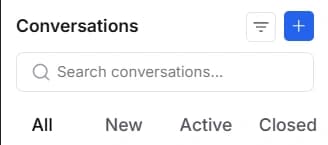
Conversation Categories
All
The All tab displays all conversations available in the Inbox, regardless of their status. Use this tab when you want a complete view of all customer conversations.
New
The New tab displays newly received conversations that have not yet been attended to. This helps agents identify fresh customer inquiries that require immediate response.
Active
The Active tab displays ongoing conversations that are currently being handled by agents. Use this tab to manage conversations that are still in progress.
Closed
The Closed tab displays conversations that have already been resolved or completed. This helps keep the Inbox organized by separating completed chats from active ones.
On this page